Mini Tool software partition for your drive
Previously, the division of the partition a hard and very afraid of losing a hard drive, especially with the drive to install the operating system. You usually have to boot from CD Hirent very long boot time consumingWith MiniTool Partition Wizard Home Edition that my following instructions, you will comfort your work easily.1: Please download the software MiniTool Partition Wizard Home Edition with ~ 20MB capacity end of the article, install it on your computer.
2: Open the software MiniTool Partition Wizard Home Edition up, click on the picture below Minitool Partition Wizard

3: The example here is you're increasing the size of the current C drive on because it is not enough for you.
If you want to change the C drive space, you have to manipulate it best drive near the screen shown above MiniTool Partition Wizard Home Edition

I will be conducting reduce disk space E: before and then "up" portion size was reduced in the E: drive through the drive C:
Right-click the drive E: choose Move / Resize as shown below:

Drag into the final frame and black arrow you drag it to the left as shown below:
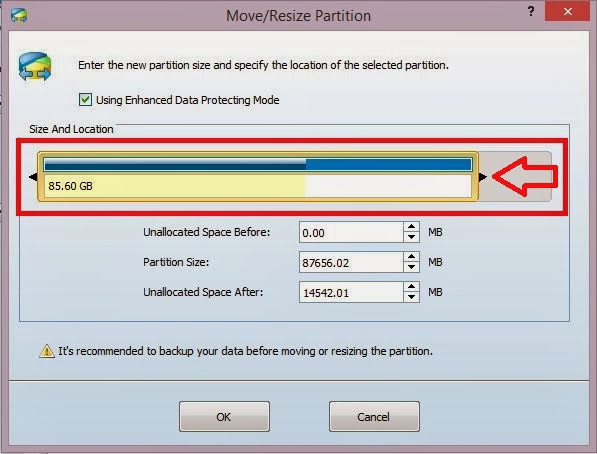
Because you want to increase the disk drive C: is located in front of the drive E: so you have to pull the space of the drive E: on the left hand side as shown below:

Click OK and then observe whether the space was close to the C: drive as shown on the yet? if so then continue on to step 4 below.

4. Right-click the C: drive, select the Move / Resize, window as shown below:
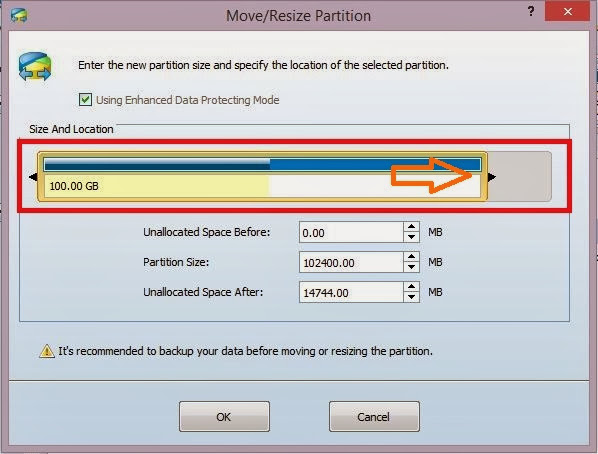
Now, you will see the space that you have cut out from drive E: in step 3. You drag the arrow to the left, is shown below:

Press OK:
5: If correct then press Apply, as in the picture below:

Waiting for1 minute to a work program is finished, you do not need to reboot at all. Open My Computer to see the results of what he had done.
Good luck.!
(Click skip ads before download if display)
Download here:
Link replacement:
Download3
